Back to guides
How to set up your Dante AI account
Head to Dante AI’s sign-up page. There are two ways to get started today.
Getting started with Dante AI
Head to Dante AI’s sign-up page.
Step 1: Create your AI agent from your website URL
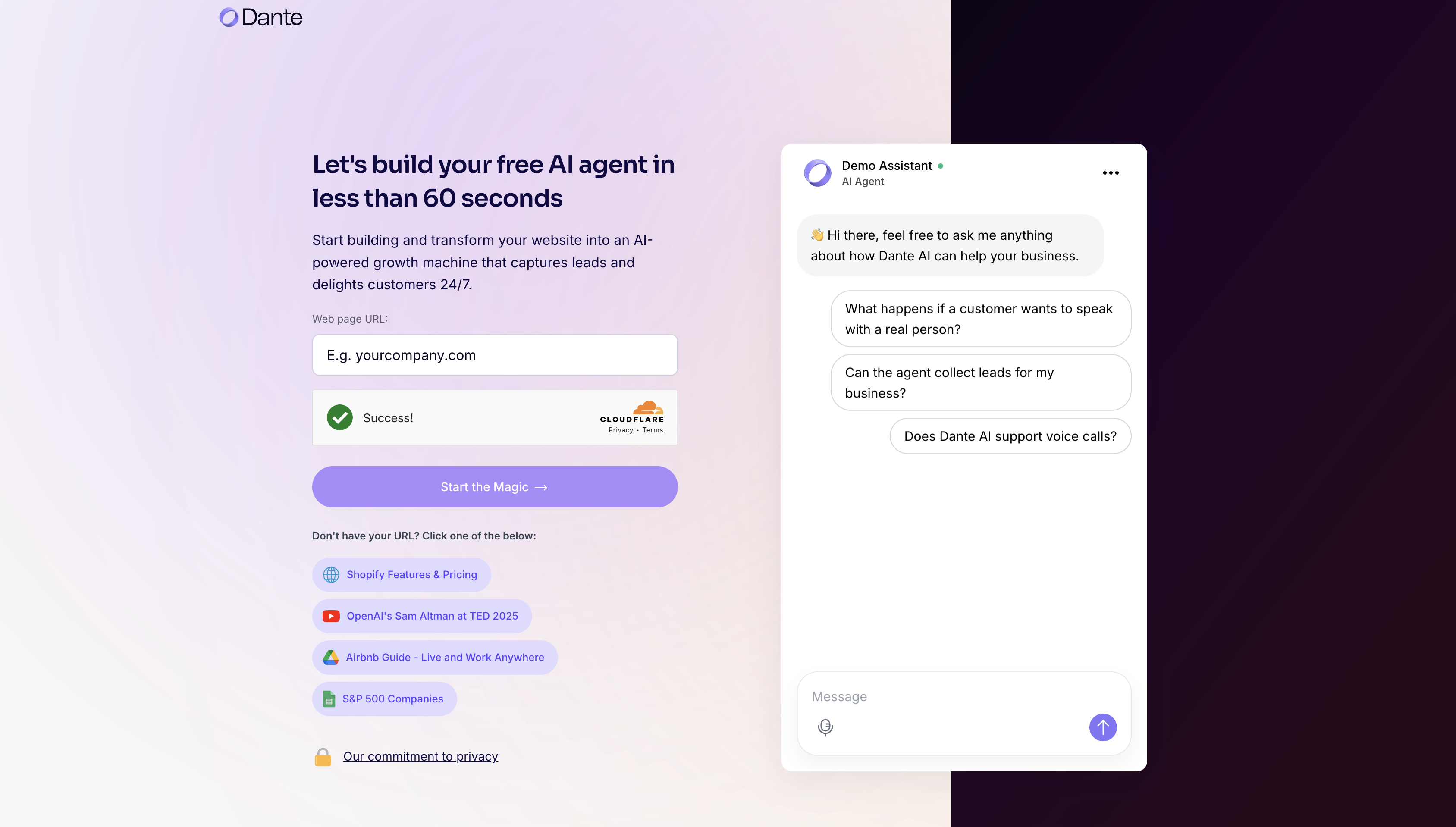
First, you will see a setup screen that helps you create an AI agent in less than 60 seconds.
- Enter your website URL
In the Web page URL field, paste the link to your website (for example, yourcompany.com).
This allows Dante AI to understand your public content and use it to answer questions.
- Complete the website verification check
Confirm the security check to continue. Once completed, you will see a success message.
- Click “Start the Magic”
This starts the build process and creates your AI agent using the content from your website.
- Optional: Use a sample URL
If you do not have a URL ready, select one of the example options below the button to try the experience quickly.
Step 2: Select your role to personalize your experience
- Wait while your AI agent is being prepared
While Dante AI is generating your agent using the website content you provided, you will be asked a few questions to personalize your experience.
- Choose your role
Select the role that best describes you. This helps Dante AI tailor guidance, examples, and recommendations to your needs.
Available options include Founder or CEO, Marketing, Customer Success, Engineering, Sales, or Other roles.

Step 3: Create your account and continue customizing your AI agent
- Choose how to sign up
Continue by signing up with Google, or enter your email address to create an account manually.
- Accept the terms
Review and accept the Terms and Privacy Policy to proceed. You can also choose whether to receive product updates and AI tips.
- Click “Get Started”
Once your details are entered, click Get Started to access your dashboard and continue customizing your AI agent.

Step 4: Verify your email and secure your account
- Check your email inbox
Dante AI sends a 6-digit verification code to the email address you used during sign-up.
- Enter the verification code
Type the 6-digit code into the verification fields on the screen to confirm your email address.
- Create your password
Set a secure password for your account. Your password must meet the following requirements:- At least 8 characters
- One uppercase letter
- One lowercase letter
- One special character
- Complete your setup
Click Complete setup to finalize your account and continue.
Resend or update your email if needed
If you did not receive the code, you can resend it. If you made a mistake in your email address, you can change it before continuing.

Next steps: Make it your own
You are all set. Your first AI chatbot is already created, and you will land directly on its dashboard after onboarding.
From here, you can keep improving it anytime:
- Add extra knowledge (files, URLs, etc.)
- Update core settings
- Adjust styling
- Fine tune the personality
- Deploy when ready
Want to create another AI chatbot from scratch? Our guide Getting started with your AI chatbot will walk you through the steps.
For extra help and to connect with other users, join our Discord community.