Back to guides
AI chatbot password protection
You can further enhance the security of your AI chatbot by adding a password. This step is particularly useful for AI chatbots handling sensitive or restricted information.
Safety and Security
You can further enhance the security of your AI chatbot by adding a password. This step is particularly useful for AI chatbots handling sensitive or restricted information.
- To add a password to your AI chatbot, click the Safety menu on the left sidebar.

- Select the AI chatbot you want to password protect and toggle the Password Protection option on.
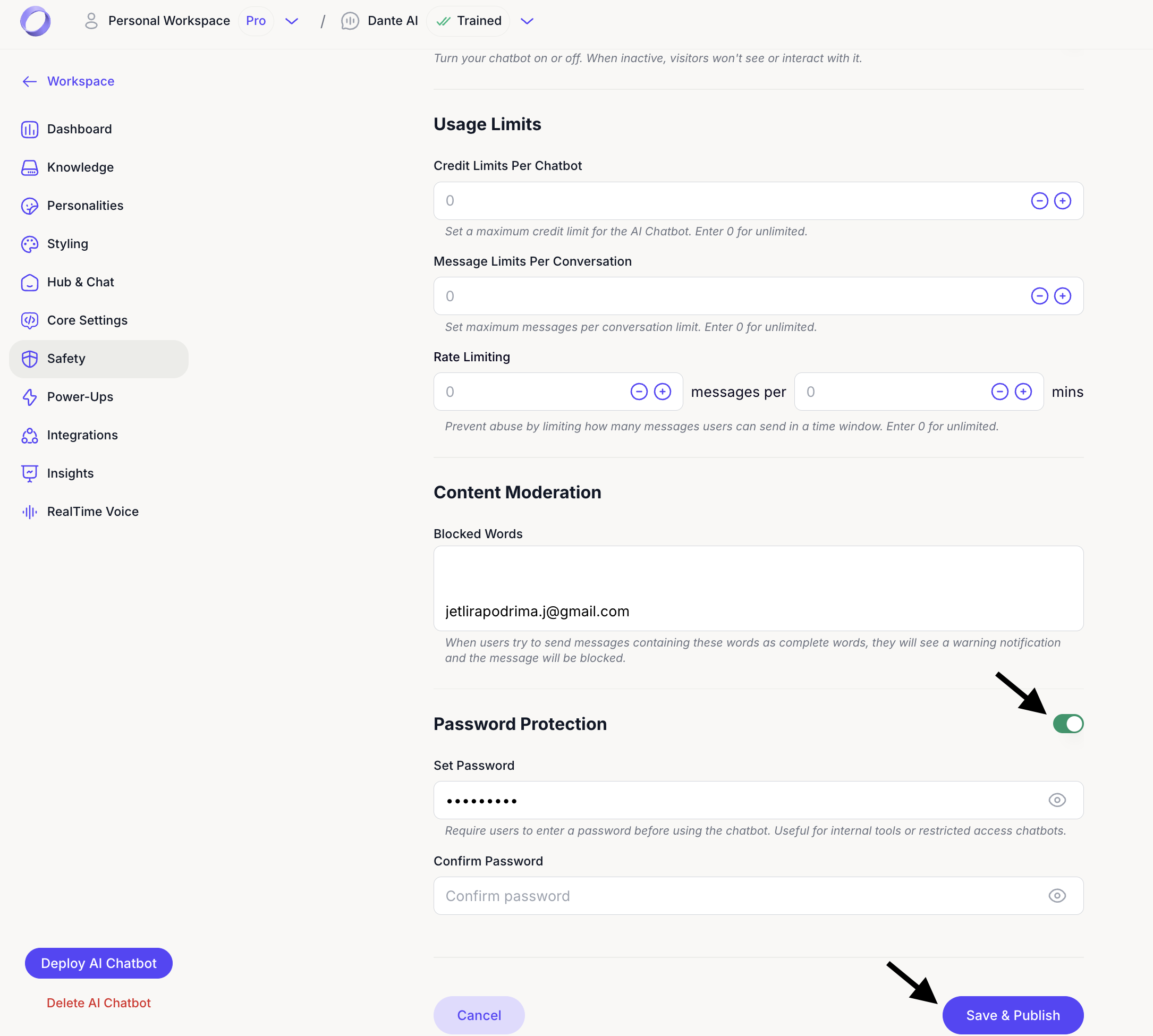
- Set your AI chatbot’s password. Click Save & Publish to confirm your new password.
Next steps: Integrate your AI chatbot with popular apps
Now that you’ve secured your AI chatbot click Next to learn how to integrate it with popular apps such as WhatsApp, Intercom, Slack, and more. Connecting your AI chatbot to these tools will enhance its functionality and expand its reach.
For additional support and to connect with other users, join our Discord community.