Back to guides
How to view your AI chatbot’s insights
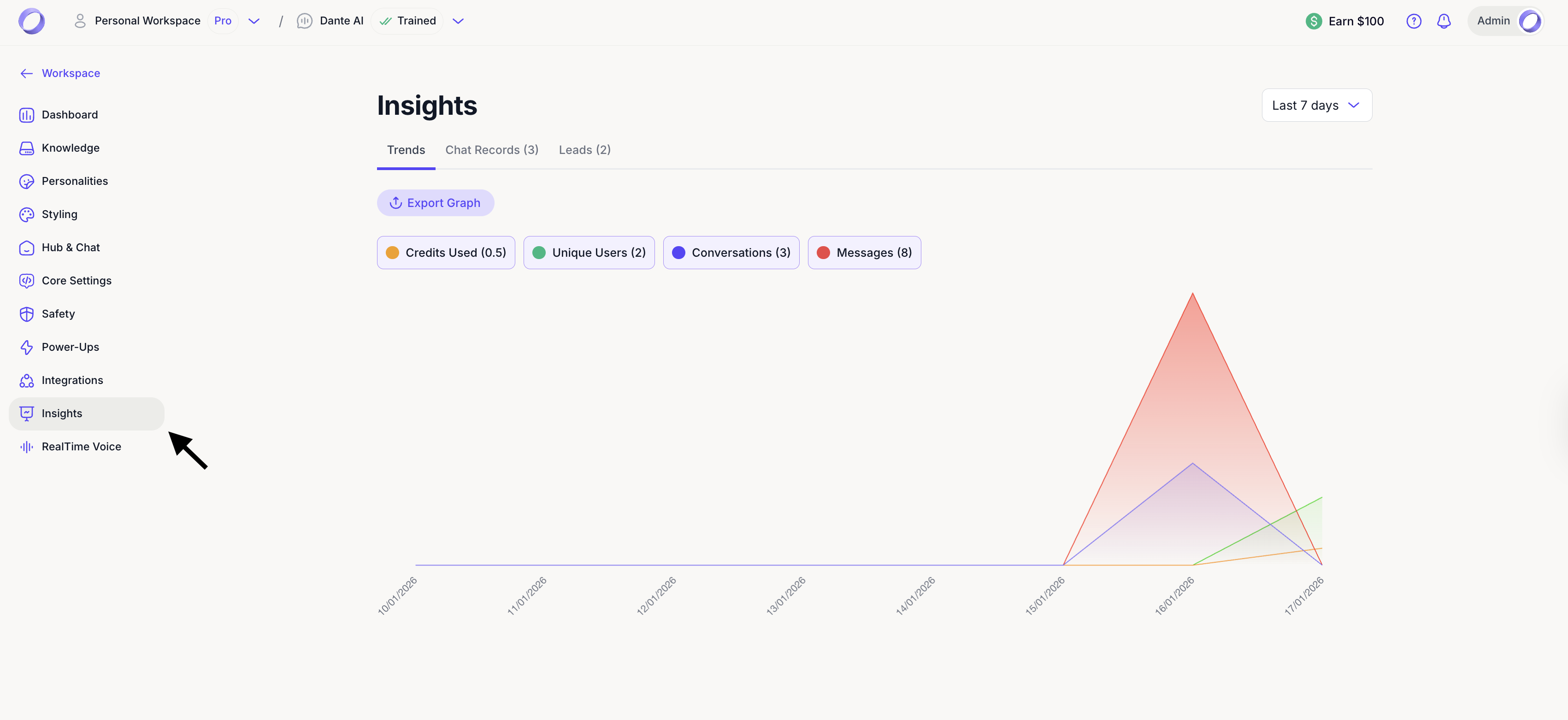
You can view the number of credits used, unique users, conversations, and messages. By analyzing this data, you can identify trends, measure engagement, and make informed decisions about your AI chatbot's performance, including how many credits to allocate.
Insights help you understand how users interact with your AI chatbot. You can view key metrics such as credits used, unique users, conversations, and messages. By reviewing this data, you can identify trends, measure engagement, and make informed decisions about performance and usage.
Where to find Insights
To access insights, first in the workspace select the AI chatbot you want to review. This will open the AI chatbot Dashboard, where you can monitor performance and usage for that specific chatbot.

From there:
- Click Insights in the left sidebar
- Review the available metrics and performance data
- Use the date filter to switch between different time periods and track progress over time
Next steps: Accessing and exporting chat records
Great job on analyzing your AI chatbot’s insights! To continue optimizing your AI chatbot, it’s important to review past interactions. In the next guide, you'll learn how to access and export chat records.
For additional support and to connect with other users, join our Discord community.