Back to guides
How to access Dante AI’s API
Only users on the Pro plan can access Dante AI’s API. After registering for a plan with API access, you’ll automatically receive the API documentation via email.
Only users on the Pro plans can access Dante AI’s API. After registering for a plan with API access, you’ll automatically receive the API documentation via email.
To access your API key, follow these steps:
- After opening your AI chatbot, click on the Integrations button in the left sidebar.
- Your API key is located at the top of the page.
- Click generate API key.
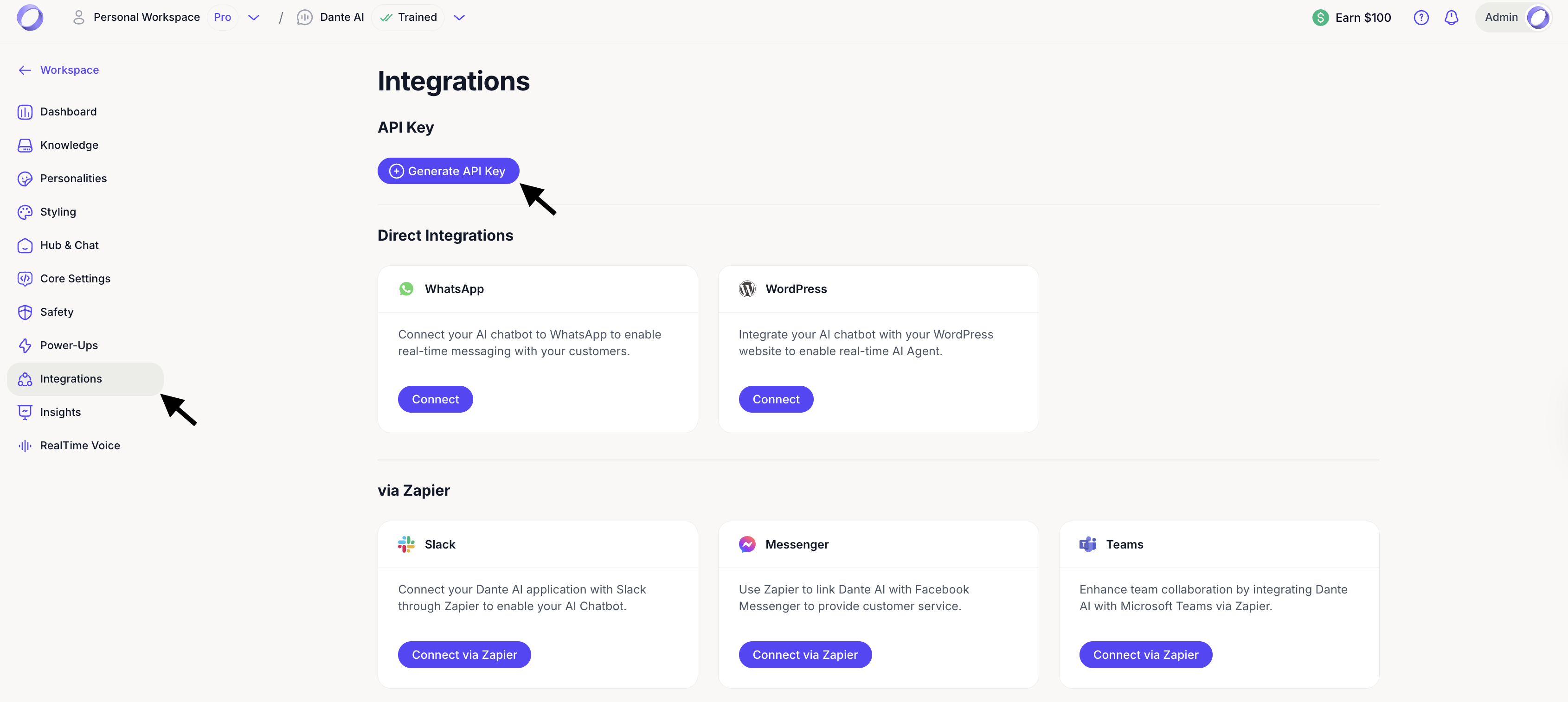
After you generate your API key, you will receive an email with the sign up details to access our API documentation portal.
If necessary, you can delete the API key by clicking the delete icon. Note that this action is irreversible, and any integrations using this API key will stop working.
For further information about using our API, contact support@dante-ai.com.
Starter plan users can generate an API key for Zapier integrations. This key is limited to Zapier usage only and does not include access to the full Dante AI API documentation.
Next steps: Use your own OpenAI API key
You can also use your own OpenAI API key if you are on the Pro plan. This allows you to extend your AI chatbot's capabilities and manage usage more flexibly, especially when your Dante AI credits run out. Click Next to learn more.
For additional support and to connect with other users, join our Discord community.